One item, different stock batches
Keeping batch information alongside item records matters when purchases of the same item arrive at different times.
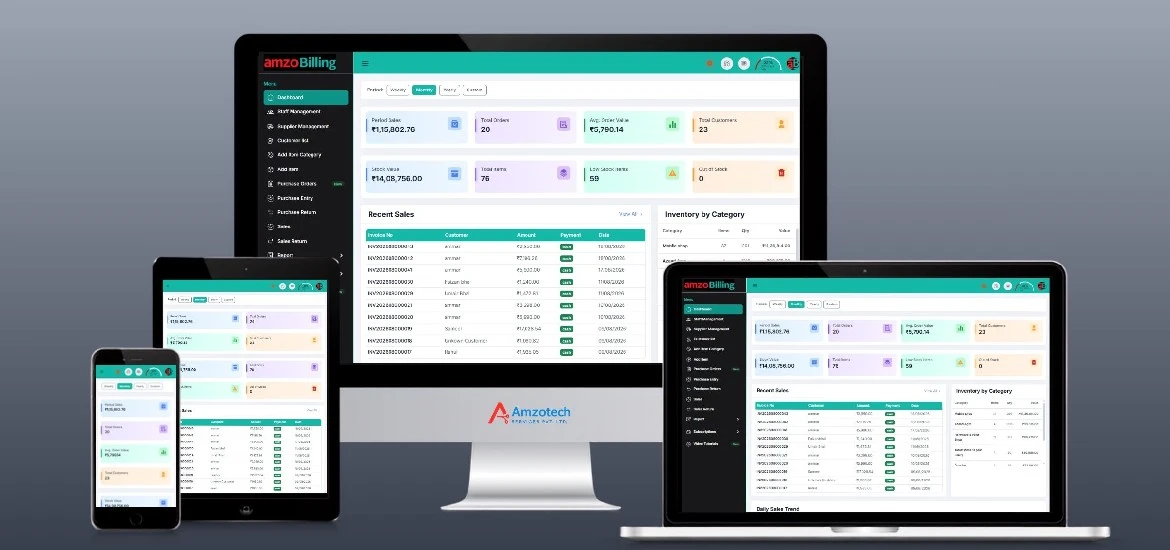
General product preview, not an industry-specific interface. Displayed figures are examples, not customer results.
Keeping batch information alongside item records matters when purchases of the same item arrive at different times.
Stock quantities alone do not tell the whole story. Teams also need to review expiry information as part of their own stock-checking routine.
Purchases, returns and outstanding supplier amounts can become hard to follow when they are kept separately from sales records.
Use the product's batch tracking and item inventory features. Ask for a demonstration showing how your staff will record and review the batches they handle.
Expiry monitoring is a confirmed product capability. Review the available views during a demo; specific alerts and automatic batch selection have not been confirmed.
Explore sales invoices, POS billing and sales returns alongside purchase entries, orders and purchase returns.
Maintain customer and supplier balances, payments and ledger statements. Review inventory, purchase, sales and item-wise reports.
Use the demonstration to check the batch and billing steps your pharmacy team needs, before deciding on a setup.
Discuss Your WorkflowBring sample item details and ask the team to show batch recording and expiry monitoring with the information your staff uses.
Review a purchase entry and a sales invoice or POS workflow. Check return handling and the available document formats.
Explore inventory and item-wise reports, then review supplier balances and ledger statements as part of your reconciliation process.
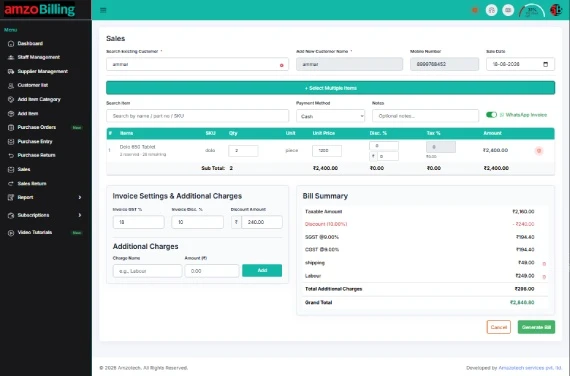
Bring your batch-recording, expiry-review and purchase-return questions to the demonstration. Confirm pharmacy-specific requirements before adopting a setup.
Request a DemonstrationOpen amzoBilling in a browser with an internet connection. Explore the web workspace and the setup that fits your business.
Web access requires internet.Selected workflows are supported offline in the Windows application, with synchronization when connectivity returns. Some actions require internet.
Confirm supported Windows versions and exact workflows in your demo.Ask us to demonstrate what works offline, which actions require internet and how reconnection is handled for your setup.
Tell us which features and workflows you need. Ask for current subscription prices, plan inclusions and setup requirements.
No payment is collected on this page.
Yes. Both are confirmed general product capabilities. Ask the team to demonstrate the exact screens and recording steps needed for your pharmacy workflow.
Automatic batch selection and first-expiry-first-out rules have not been verified. Ask the team to show the current behaviour; this page does not promise those functions.
Purchase orders, purchase entries, purchase returns, supplier accounts, payments and ledger statements are supported. Review the handling of your own return scenarios during the demonstration.
No. This page describes the supplied billing, inventory and account capabilities. Pharmacy-specific requirements must be reviewed with the product team before adoption; prescription processing and statutory submissions are not advertised here.
No pharmacy-specific application screenshots were supplied. The images shown are existing general amzoBilling screens and are labelled accordingly. Request a demonstration of the batch and expiry workflow.
Selected workflows work offline in the Windows desktop application, with synchronization after reconnection. Some actions require internet. Ask for a demonstration of the exact offline actions, internet-required features and synchronization behaviour for your setup.
Use a Book a Demo or Request Pricing link to open WhatsApp with a prepared enquiry, or call +91 81496 20255. Nothing is sent automatically, and an enquiry does not confirm an appointment. Ask the team for current plan inclusions and prices.
Serial/IMEI records, purchase-cycle history, counter billing and customer accounts.
Explore Mobile ShopsItem catalogues, barcode labels, counter billing and returns for apparel stores.
Explore Garments & ApparelBring a typical sale, an inventory question or a customer balance scenario. Let’s walk through the relevant workflow.
Demo enquiries open WhatsApp with a prepared message. Nothing is sent until you choose to send it. We use the details you share to respond to your enquiry. Privacy Policy.